Stop the Damage First on a Binance Account You Think Was Hacked
If your Binance account shows a login, an order or a withdrawal request you didn't make, stop the damage first and halt anything that may still be going on. Unlocking the account and getting withdrawals back can wait until later.
Step one, stop the damage: if you can still log in, disable the account first (section 01). If you don't disable it, at the very least change the password right away, delete devices and API keys you don't recognize, and check for any activity that wasn't yours (sections 02 and 03). If you're already locked out, reset the password yourself from [Forgot password?] on the login page (section 02), and contact Binance Support as soon as you can: tell them when you first noticed something wrong, and bring the suspicious emails, login records and transaction records (section 04).
Step two, recover: once the risk is under control, deal with unlocking the account, getting withdrawals back and changing your email or phone number (sections 05 and 06). After a password change, withdrawals pause for 24 to 48 hours and come back on their own; if you disable the account and later unlock it, allow up to 48 hours before you can withdraw.
01Disabling your account in the Binance app or on the website
According to the Help Center article How to Disable My Binance Account, if you notice any suspicious activity on your Binance account, you can disable it to protect your assets by following its steps. There are three steps in the app and three on the website.
In the Binance app:
- Log in to the Binance app and go to [Account Info] - [Security].
- Scroll down and tap [Manage Account] - [Disable Account].
- Read the notes carefully, tap [Disable Account] and complete the security verifications.
On the Binance website:
- Log in, click the profile icon and then [Account], and click [Security] in the side menu bar.
- Scroll down to 'Account Management' - 'Disable Account' and click the [Disable] button.
- Read the notes carefully, click [Disable Account] and complete the security verifications.
Finish reading the notes before you click [Disable Account]. Both versions start with logging in, so if you can't get into the account, this option is out of reach; reset the password first, as described in the next section, and contact support at the same time, as described in section 04.
02Reset your Binance password from [Forgot password?] on the login page
The first item in Binance's security blog post Stay Safe: What to Do if Your Account Gets Compromised is to change your password immediately, choosing a strong one that you don't use for any other account. If you can still log in, you can change it directly under [Security] - [Login Password] - [Manage]. You can also follow the Help Center steps in How to Reset Your Binance Account Password?. They work on the website and in the app, and because they start from the login page, they work even when you're already locked out. Before you begin, know what the reset costs you.
For security reasons, withdrawals, P2P selling, payment services and internal transfers are disabled for 24 hours after a password reset.
- On the Binance website, click [Log In]; in the app, tap [Sign Up / Log In].
- Enter the email or phone number on your account and click [Next].
- If the account has passkeys enabled, you'll be asked to verify with a passkey. Click [Cancel], choose [My Passkeys Are Not Available], then click [Forgot password?].
- Read the notes in the pop-up, then click [Continue].
- Complete the required security verifications.
- Enter a new password and click [Confirm]. It needs at least 8 characters, including at least 1 number and 1 upper-case letter.
- Once the reset succeeds, log in with the new password.
If you get stuck at step 5 because your passkey isn't available, click [My Passkeys Are Not Available] and verify with another two-factor authentication (2FA) device. If none of your 2FA devices work, this route ends there: switch to the Help Center's How to Reset 2FA When I Can't Access My Binance Account? and follow its step-by-step guide.
03Delete devices and API keys you don't recognize, and check your account activity
Whether or not you disabled the account first, go through the checks below so that the logins and keys the other person left behind stop working. If you can still act on the account, handle each item now. If the account is already disabled, or there's something you can't check or fix yourself, contact Binance's official support as described in section 04, tell them which devices, API keys and activity you suspect, and ask what to do next:
- Devices: following the path in the security blog post, go to [Security] - [Devices and Activities] - [Device Management] and delete devices you don't recognize or no longer use.
- API keys: Binance Academy's What Are API Keys and Security Types? advises that if you suspect a key has been compromised, you delete it in API management, generate a new one if you need it, and check whether any unauthorized activity took place.
- Account activity and transaction history: go through them entry by entry and write down every login, change and trade that wasn't you; you'll need the list when you contact support in section 04.
- Your linked email (general security practice rather than a Binance requirement): first make sure the email address on the account is still in your hands and you can log in to it, then change the email password and remove any login devices you don't recognize from the mailbox.
04Contacting Binance Support: bring the suspicious emails and login records
If you can't log in any more, or you've found suspicious activity, the security blog post says to contact support as soon as possible, tell them when you first noticed something wrong, and offer any evidence or data that may aid the investigation, including dubious emails, login attempts or transaction logs. You'll also need support later if the unlock fails, if there's no [Appeal] button on the withdrawal page, or if you want to appeal a withdrawal restriction Binance has placed on you. For your own account, that means:
- When you first noticed: write down the day and time you saw that something was wrong.
- Suspicious emails: login alerts you don't recognize, password-change notices, messages pretending to come from Binance. Keep them as they are and don't delete them.
- Login attempts: note the time of every login that wasn't you.
- Transaction history: for each order, transfer or withdrawal you didn't make, write down the time, the coin and the amount.
The support entry is only on the official website and in the official app. Before you reach out, have your UID, order number and TxID ready. If you were tricked into sending the coins yourself, Binance has a separate scam report entry and case report form; include the transaction ID and the other party's address when you submit it.
05How to unlock a disabled Binance account
If the account is already disabled, finish the security checks in section 03 first; for anything you can't do yourself, check with support first, then unlock through the official process. A disabled account doesn't mean the risk has gone away. Once disabled, the account can be unlocked on the Binance website or in the app, following How to Unlock My Binance Account?. After a successful unlock, allow up to 48 hours before you can withdraw funds or make Binance P2P transactions. If you have coins you need to move soon, count that wait in.
- Log in to your Binance account; when the pop-up appears, select [Unlock].
- Complete the required security verifications. Which checks you get depends on the status of your account.
- Read the result in the notification that appears.
- Unlock successful: you can log in and access the account.
- Unlock request under review: wait for the result, which is sent to you by email.
- Unlock unsuccessful: try again, or contact Customer Support.
06Can Binance withdrawals come back early after a password change?
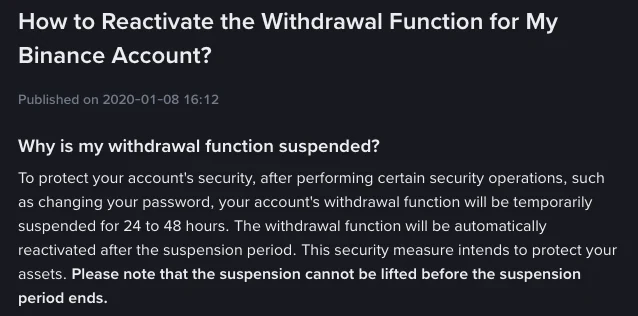
No, you wait for the period to end. The Help Center article How to Reactivate the Withdrawal Function for My Binance Account? treats the withdrawal pause after a password change as a security measure to protect your assets, says withdrawals are reactivated automatically once it ends, and states that the suspension cannot be lifted before then. The two help articles give different lengths: the password reset article says 24 hours (for withdrawals, P2P selling, payment services and internal transfers), while the withdrawal article says 24 to 48 hours after a security operation such as a password change. Changing your email or phone number brings a similar lock, with withdrawals, internal transfers and P2P transactions disabled for up to 48 hours afterwards.
Withdrawals are also temporarily suspended when the system detects abnormal activity on the account. One of these three messages may appear:
| The message | What it means | What to do next |
|---|---|---|
| Your withdrawal may be at risk. You can try again in 24 hours. | The withdrawal is under review | Wait for an email with its latest status; if emails from Binance aren't reaching you, check your email settings |
| Your withdrawal may be at risk. You can try again in 48 hours. | A security measure to protect your assets; the suspension can't be lifted early | Wait the full 48 hours |
| Your withdrawal function may be suspended due to risk of fraudulent activity. | The withdrawal appears to match known patterns of fraud and may have triggered Binance's anti-scam measures | Binance may ask you to complete an anti-scam questionnaire, acknowledge warning messages before the withdrawal is processed, and wait through a cool-down period |
If withdrawals were paused because the system flagged something and you're asked to verify your identity, you can do that on the website or in the app. Once the review approves it, withdrawals resume shortly. If you don't pass, file a withdrawal appeal.
Ignore anyone in a direct message or group chat who offers to lift the suspension early for you.
FAQAppealing a withdrawal pause on Binance
Where is the withdrawal appeal button on Binance?
You need it when identity verification fails. On the website, go to the Withdraw Crypto page, click [Withdraw appeal] in the alert and submit the required documents. In the app, go to [Wallets] and tap [Spot] - [Withdraw]; when the pop-up appears, tap [Appeal] and follow the instructions. If you can't see an [Appeal] button in either place, contact Binance Support.
How do I appeal a failed facial verification on Binance?
Clicking [Appeal] takes you to the [Facial Verification Appeal] page. You may need to answer security questions before you submit; answer them carefully, or the appeal may be rejected. Then provide the materials the page asks for, following its instructions and examples. If you have trouble providing them, or have other information that could help, add it under [Additional Information]. The result comes by SMS or email.
Will Binance tell me if it restricts my withdrawals?
Under normal circumstances, yes. When Binance restricts an account, it informs the affected user by email, SMS or in-app notification, with the cause and the next steps available, and a pop-up on the next login explains why the account was suspended. To appeal, contact Customer Service directly, though not every restriction is open to appeal, particularly where law enforcement orders or regulatory obligations are involved.