Changing Your Binance Email or Phone Number: Two Routes, and What Locks for Up to 48 Hours
Changing your email and changing your phone number are two separate routes, but they start at the same door: log in, hover over the [Profile] icon, click [Account], go to [Security], then click [Manage] next to Email or Phone Number. Each route is seven steps, and Binance's Help Center lays them out one by one in "How to Change My Binance Account Email?" and "How to Reset My Phone Number for SMS Verification on the Binance Website?" (both pages checked in September 2026). The steps below follow them in order.
Know the cost before you start. Both pages state that after the change, withdrawals, internal transfers and P2P transactions are disabled for up to 48 hours. Changing your email adds one more condition: the old address can't be used to register again for 30 days. There's also a precondition — both routes make you pass a 2FA check partway through, so your existing verification method still has to be in your hands.
01First, know what the change costs you
The two pages agree on this. The email page puts it this way: "after changing your email address, withdrawals, internal transfers and P2P transactions will be disabled for up to 48 hours for security reasons". The phone page swaps in a different lead-in — "In order to protect your account" — and then names the same three functions.
- Email change: those three functions are disabled for up to 48 hours, and the old email can't be used to re-register for 30 days.
- Phone change: the same three functions are disabled for up to 48 hours, with no 30-day rule.
- Not on the list: trading outside P2P. Both pages name only those three functions.
Read "up to 48 hours" carefully. It's a ceiling, not a promised duration. The pages don't say how long it usually takes to lift, or whether there's any way to end it early.
The screenshot below shows the notice on step 4 of the email-change page, taken from the Chinese-language version of the Help Center article "How to Change My Binance Account Email?" in September 2026:
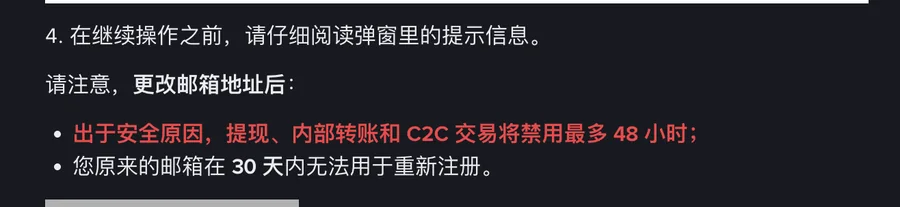
Of the two notices on that page, one covers the 48 hours and the other covers the 30 days. The rest of the steps are routine, as long as you can still pass 2FA at step 5.
02Changing your email: seven steps on the website
Follow the order in "How to Change My Binance Account Email?" (original Help Center page):
- Log in to your Binance account, hover over the [Profile] icon, then click [Account].
- Go to [Security] and click [Manage] next to [Email].
- Click the [Edit] icon.
- A pop-up appears. Read the notes in it before you click any further — they're the two lines in the screenshot above.
- Verify the request with your passkey or 2FA devices. If you can't get past this step, you can't go any further.
- Enter your new email address and click [Get Code]. Fetch the code from the new inbox, enter it on the page and click [Submit].
- Once the page shows your email has been updated, you're done.
The code goes to the new email, so the new address has to be one you can open and receive mail at right now. Log in to it once before you start and make sure ordinary mail comes through — don't wait until the page is counting down to find out you can't get in. For all the ways a code can fail to show up, not getting your Binance code works through SMS, email and authenticator codes separately.
One more thing: the button names on your screen may not match what's quoted here word for word, especially if your interface is set to another language, so go by where the button sits.
03Changing your phone number: same door, different turn
This page opens by saying who it's for: "You can reset the phone number you use for two-factor authentication (2FA) if you cannot receive SMS verification codes." The only situation it names is not receiving SMS codes; whether you should also use it when you've switched numbers or your old number has been cancelled, the page doesn't say separately (original Help Center page).
- After logging in, hover over [Profile] and click [Account]. This is the same step as for email.
- Go to [Security] and click [Manage] next to [Phone Number]. This is where the two routes split.
- Click the edit icon next to the phone number you want to change.
- Read the notes in the pop-up carefully, then click [Continue].
- Complete 2FA to continue.
- Enter the new phone number and click [Get Code]. The new number receives an SMS code; enter it and click [Submit].
- The page confirms your new phone number has been verified.
Compared with the email route, three things differ. In step 3 you click the edit icon next to the specific number you're changing. In step 4 the phone page also tells you to click [Continue] after reading the notes; the email page doesn't mention that button. In step 6 the code arrives by SMS on the new number. So the new SIM has to be in your phone, with signal, able to receive texts. If you've just switched carriers or you're roaming, send the new number a test text from another phone first, instead of finding out halfway through.
04Before you start, confirm two things
The first is a hard requirement: your existing verification method still has to work. Step 5 of the email route asks you to "Verify the request with your passkey or 2FA devices", and step 5 of the phone route says "Complete 2FA to continue" — both routes hinge on that step. A passkey, a code from your authenticator app, or SMS on your old phone: you need at least one of them still in hand.
If your old number was cancelled long ago and your authenticator went with your old phone, neither page is for you. Both assume you can still get through a full 2FA check. Resetting lost 2FA is a separate matter that these two pages don't cover, and this guide doesn't go into it either. First work out which verification route you still have, using not getting your Binance code, then come back to the change.
The second is a suggestion, not an official rule: don't change your email or phone number right before you need to withdraw. Withdrawals are disabled for a while afterwards, so it's best to finish any planned withdrawals and confirm they've arrived before you make the change. Do it the other way round and you'll be staring at a withdraw button that won't do anything.
05The lock after the change (up to 48 hours)
Going by the list both pages spell out, during this window:
- You can't: withdraw, make internal transfers or make P2P transactions.
- Not on the list: trading outside P2P — it doesn't appear among the disabled functions.
- How long: the wording is "up to 48 hours". The pages don't say how soon it usually lifts, whether you can end it early, or how to tell it's over; you can try the withdrawal page again every so often.
Do three things right after the change: update the new email or number in your password manager so the record doesn't stay on the old one; log out and back in to confirm the new channel really receives codes; and check that your anti-phishing code is still there. In security settings to do first, 2FA, the anti-phishing code and the withdrawal whitelist are set up as one package — worth going through again after a change like this.
Something else that's easy to miss: neither page says whether the change touches your anti-phishing code or withdrawal whitelist — so after the change, go into the security settings and check each item yourself. If you changed your email, the place your alerts land changes too: platform emails that used to reach the old address now go to the new one. To confirm the change went through, log in and look at the login history and security settings in your account; that's more reliable than digging through email.
If something else goes wrong during the lock and you need Binance support, start from the official Binance Help Center. And if anyone contacts you out of the blue while you wait, offering to lift the restriction early, that offer on its own is reason to hang up.
FAQFrequently asked questions
Why can't I withdraw after the change?
It's a built-in part of the process, not a problem with your account. Both pages say that after the change, withdrawals, internal transfers and P2P transactions are disabled for up to 48 hours. The wording is "up to", and the pages don't say how soon it usually lifts, whether you can end it early, or how to tell it's over; you can try the withdrawal page again every so often. Buying and selling isn't on the disabled list during this time.
Will changing my phone number affect how I log in?
These two pages only cover the steps for changing the linked email or number and which functions are disabled afterwards; they say nothing about whether your login method changes. The safe move is to log out and back in after the change and confirm the new number really receives codes. Authenticator app codes are generated on your device from a secret key and the current time, not sent to your number; these two pages don't say anything about that route when you change numbers.
Can I use my old email to register again later?
Not within 30 days. The notice in step 4 of the email-change process says your old email address cannot be used to re-register for 30 days. The phone-change page has no matching rule. Whether it works after 30 days, the page doesn't say, so don't assume it will.
Can I make these changes in the Binance app?
Both seven-step routes in this guide come from Binance Help Center articles for the website. Those two pages only cover the website and don't say how it works in the app, so I'd suggest doing it in a desktop browser, following the route above.